> ## Documentation Index
> Fetch the complete documentation index at: https://mintlify.com/mlfoundations/open_clip/llms.txt
> Use this file to discover all available pages before exploring further.

# OpenCLIP Documentation

> An open source implementation of CLIP for contrastive language-image pre-training

<div className="relative overflow-hidden bg-gradient-to-b from-[#1a0505] via-[#2d0a0a] to-[#0f1117] dark:from-[#1a0505] dark:via-[#2d0a0a] dark:to-[#0f1117] py-20">
  <div className="absolute inset-0 bg-[url('/grid.svg')] opacity-20" />

  <div className="relative max-w-6xl mx-auto px-6 sm:px-8">
    <div className="grid lg:grid-cols-12 gap-8 items-center">
      <div className="lg:col-span-7">
        <h1 className="text-4xl sm:text-5xl lg:text-6xl font-bold text-white mb-6">
          OpenCLIP Documentation
        </h1>

        <p className="text-lg sm:text-xl text-gray-300 dark:text-gray-300 mb-8 max-w-2xl">
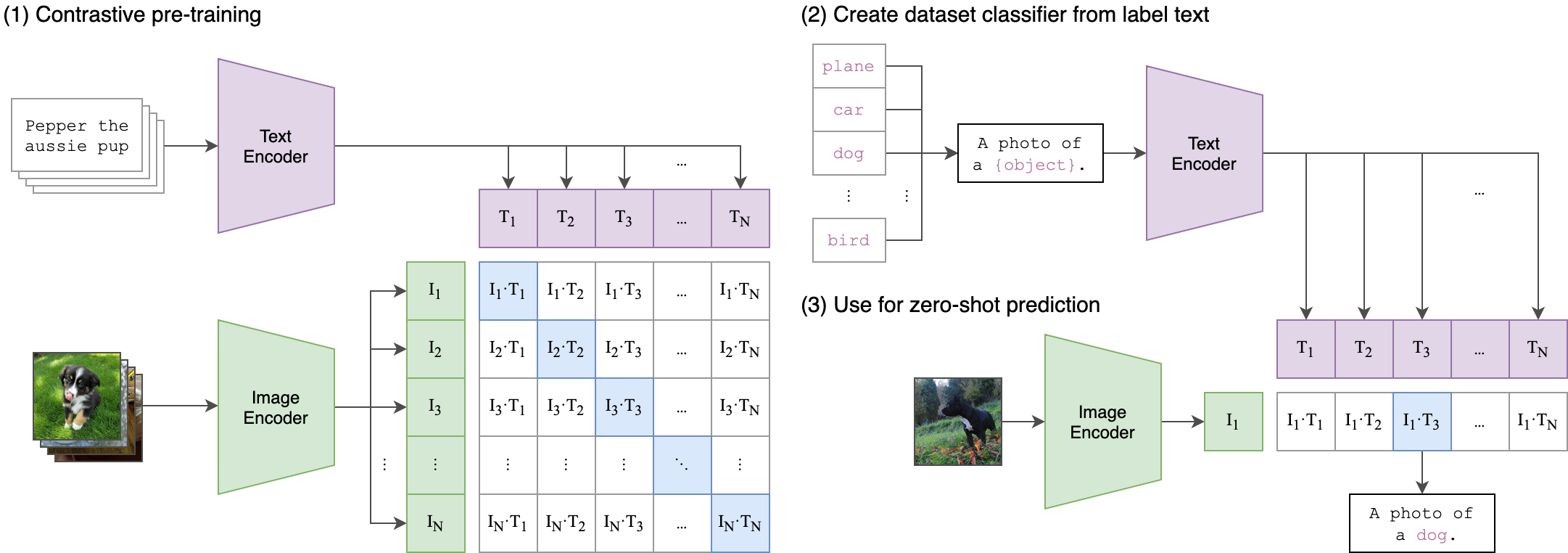
          Build powerful vision-language models with OpenCLIP. Train CLIP models at scale, leverage state-of-the-art pretrained weights, and perform zero-shot image classification and retrieval.
        </p>

        <div className="flex flex-wrap gap-4">
          <a href="/quickstart" className="inline-flex items-center px-6 py-3 rounded-lg font-semibold text-white bg-[#b21e1e] hover:bg-[#8f1818] transition-colors">
            Get Started

            <svg className="ml-2 w-5 h-5" fill="none" stroke="currentColor" viewBox="0 0 24 24">
              <path strokeLinecap="round" strokeLinejoin="round" strokeWidth={2} d="M13 7l5 5m0 0l-5 5m5-5H6" />
            </svg>
          </a>

          <a href="/api/create-model" className="inline-flex items-center px-6 py-3 rounded-lg font-semibold text-white border border-white/30 bg-white/10 hover:bg-white/20 hover:border-white/50 transition-colors">
            API Reference
          </a>
        </div>
      </div>

      <div className="lg:col-span-5 hidden lg:block">
        <div className="relative">
          <img src="https://raw.githubusercontent.com/mlfoundations/open_clip/main/docs/CLIP.png" alt="CLIP architecture diagram showing dual encoder structure" noZoom className="w-full h-auto rounded-lg border border-white/10" />
        </div>
      </div>
    </div>
  </div>
</div>

<div className="mt-16 mb-16 max-w-5xl mx-auto px-6">
  <h2 className="text-2xl sm:text-3xl font-semibold text-gray-900 dark:text-white mb-4">
    Quick start
  </h2>

  <p className="text-base text-gray-600 dark:text-gray-400 mb-8">
    Get up and running with OpenCLIP in minutes
  </p>

  <Steps>
    <Step title="Install OpenCLIP">
      Install the package using pip:

      ```bash theme={null}
      pip install open_clip_torch
      ```

      <Note>
        If you plan to use timm-based image encoders (ConvNeXt, SigLIP, EVA), ensure you have the latest timm installed: `pip install -U timm`
      </Note>
    </Step>

    <Step title="Load a pretrained model">
      Load a model with pretrained weights and preprocessing transforms:

      ```python theme={null}
      import open_clip

      model, _, preprocess = open_clip.create_model_and_transforms(
          'ViT-B-32',
          pretrained='laion2b_s34b_b79k'
      )
      model.eval()
      ```

      <Accordion title="Available pretrained models">
        OpenCLIP provides 80+ pretrained models. List all available models:

        ```python theme={null}
        import open_clip

        # List all pretrained model configurations
        open_clip.list_pretrained()
        ```
      </Accordion>
    </Step>

    <Step title="Encode images and text">
      Use the model to compute embeddings for zero-shot classification:

      ```python theme={null}
      import torch
      from PIL import Image

      # Get tokenizer
      tokenizer = open_clip.get_tokenizer('ViT-B-32')

      # Load and preprocess image
      image = preprocess(Image.open("image.jpg")).unsqueeze(0)
      text = tokenizer(["a cat", "a dog", "a bird"])

      # Compute features
      with torch.no_grad(), torch.autocast("cuda"):
          image_features = model.encode_image(image)
          text_features = model.encode_text(text)
          
          # Normalize features
          image_features /= image_features.norm(dim=-1, keepdim=True)
          text_features /= text_features.norm(dim=-1, keepdim=True)
          
          # Compute similarity and get predictions
          text_probs = (100.0 * image_features @ text_features.T).softmax(dim=-1)

      print("Predictions:", text_probs)
      ```
    </Step>

    <Step title="Train your own model">
      Train a CLIP model on your own dataset:

      ```bash theme={null}
      python -m open_clip_train.main \
          --train-data="/path/to/train_data.csv" \
          --val-data="/path/to/validation_data.csv" \
          --csv-img-key filepath \
          --csv-caption-key title \
          --warmup 10000 \
          --batch-size=128 \
          --lr=1e-3 \
          --wd=0.1 \
          --epochs=30 \
          --workers=8 \
          --model RN50
      ```

      <Info>
        OpenCLIP supports distributed training on multiple GPUs and nodes. See the [Training guide](/training/overview) for details.
      </Info>
    </Step>
  </Steps>
</div>

<div className="mt-16 mb-16 max-w-5xl mx-auto px-6">
  <h2 className="text-2xl sm:text-3xl font-semibold text-gray-900 dark:text-white mb-4">
    Key features
  </h2>

  <p className="text-base text-gray-600 dark:text-gray-400 mb-8">
    Everything you need to build and deploy vision-language models
  </p>

  <CardGroup cols={3}>
    <Card title="State-of-the-art models" icon="trophy" href="/usage/pretrained-models">
      Access 80+ pretrained CLIP models achieving up to 85.4% ImageNet zero-shot accuracy
    </Card>

    <Card title="Flexible architectures" icon="shapes" href="/usage/loading-models">
      Support for ViT, ResNet, ConvNeXt, and custom vision/text encoder combinations
    </Card>

    <Card title="Large-scale training" icon="server" href="/training/distributed-training">
      Battle-tested on up to 1024 GPUs with LAION-2B and DataComp-1B datasets
    </Card>

    <Card title="Zero-shot inference" icon="wand-magic-sparkles" href="/concepts/zero-shot-classification">
      Classify images without training using natural language descriptions
    </Card>

    <Card title="CoCa support" icon="comment" href="/training/coca">
      Generate image captions with contrastive captioner models
    </Card>

    <Card title="HuggingFace integration" icon="face-smile" href="/advanced/push-to-hub">
      Load models from or push to the Hugging Face Hub seamlessly
    </Card>
  </CardGroup>
</div>

<div className="mt-16 mb-16 max-w-5xl mx-auto px-6">
  <h2 className="text-2xl sm:text-3xl font-semibold text-gray-900 dark:text-white mb-4">
    Explore by topic
  </h2>

  <p className="text-base text-gray-600 dark:text-gray-400 mb-8">
    Dive deeper into specific areas of OpenCLIP
  </p>

  <div className="grid grid-cols-1 md:grid-cols-2 gap-4">
    <a href="/concepts/clip-overview" className="group block rounded-2xl border border-gray-200 dark:border-[#27272a] hover:border-[#b21e1e] dark:hover:border-[#b21e1e] overflow-hidden transition-colors no-underline bg-white dark:bg-[#1a1d27]">
      <div className="h-48 overflow-hidden flex items-center justify-center bg-gradient-to-br from-[#e59f82]/20 to-[#b21e1e]/20 dark:from-[#e59f82]/10 dark:to-[#b21e1e]/10">
        <svg className="w-20 h-20 text-[#b21e1e]" fill="none" stroke="currentColor" viewBox="0 0 24 24">
          <path strokeLinecap="round" strokeLinejoin="round" strokeWidth={1.5} d="M9.663 17h4.673M12 3v1m6.364 1.636l-.707.707M21 12h-1M4 12H3m3.343-5.657l-.707-.707m2.828 9.9a5 5 0 117.072 0l-.548.547A3.374 3.374 0 0014 18.469V19a2 2 0 11-4 0v-.531c0-.895-.356-1.754-.988-2.386l-.548-.547z" />
        </svg>
      </div>

      <div className="p-6">
        <h3 className="text-base font-semibold text-gray-900 dark:text-white mb-2 group-hover:text-[#b21e1e] transition-colors">
          Core concepts
        </h3>

        <p className="text-sm text-gray-600 dark:text-gray-400 mb-3">
          Understand CLIP architecture, contrastive learning, and zero-shot classification
        </p>

        <div className="flex items-center text-sm font-medium text-gray-900 dark:text-gray-300 group-hover:text-[#b21e1e] transition-colors">
          Learn more

          <svg className="ml-1 w-4 h-4" fill="none" stroke="currentColor" viewBox="0 0 24 24">
            <path strokeLinecap="round" strokeLinejoin="round" strokeWidth={2} d="M9 5l7 7-7 7" />
          </svg>
        </div>
      </div>
    </a>

    <a href="/training/overview" className="group block rounded-2xl border border-gray-200 dark:border-[#27272a] hover:border-[#b21e1e] dark:hover:border-[#b21e1e] overflow-hidden transition-colors no-underline bg-white dark:bg-[#1a1d27]">
      <div className="h-48 overflow-hidden flex items-center justify-center bg-gradient-to-br from-[#e59f82]/20 to-[#b21e1e]/20 dark:from-[#e59f82]/10 dark:to-[#b21e1e]/10">
        <svg className="w-20 h-20 text-[#b21e1e]" fill="none" stroke="currentColor" viewBox="0 0 24 24">
          <path strokeLinecap="round" strokeLinejoin="round" strokeWidth={1.5} d="M13 10V3L4 14h7v7l9-11h-7z" />
        </svg>
      </div>

      <div className="p-6">
        <h3 className="text-base font-semibold text-gray-900 dark:text-white mb-2 group-hover:text-[#b21e1e] transition-colors">
          Training guide
        </h3>

        <p className="text-sm text-gray-600 dark:text-gray-400 mb-3">
          Train CLIP models from scratch on single or multiple nodes with distributed training
        </p>

        <div className="flex items-center text-sm font-medium text-gray-900 dark:text-gray-300 group-hover:text-[#b21e1e] transition-colors">
          Start training

          <svg className="ml-1 w-4 h-4" fill="none" stroke="currentColor" viewBox="0 0 24 24">
            <path strokeLinecap="round" strokeLinejoin="round" strokeWidth={2} d="M9 5l7 7-7 7" />
          </svg>
        </div>
      </div>
    </a>

    <a href="/usage/inference" className="group block rounded-2xl border border-gray-200 dark:border-[#27272a] hover:border-[#b21e1e] dark:hover:border-[#b21e1e] overflow-hidden transition-colors no-underline bg-white dark:bg-[#1a1d27]">
      <div className="h-48 overflow-hidden flex items-center justify-center bg-gradient-to-br from-[#e59f82]/20 to-[#b21e1e]/20 dark:from-[#e59f82]/10 dark:to-[#b21e1e]/10">
        <svg className="w-20 h-20 text-[#b21e1e]" fill="none" stroke="currentColor" viewBox="0 0 24 24">
          <path strokeLinecap="round" strokeLinejoin="round" strokeWidth={1.5} d="M4 16l4.586-4.586a2 2 0 012.828 0L16 16m-2-2l1.586-1.586a2 2 0 012.828 0L20 14m-6-6h.01M6 20h12a2 2 0 002-2V6a2 2 0 00-2-2H6a2 2 0 00-2 2v12a2 2 0 002 2z" />
        </svg>
      </div>

      <div className="p-6">
        <h3 className="text-base font-semibold text-gray-900 dark:text-white mb-2 group-hover:text-[#b21e1e] transition-colors">
          Model usage
        </h3>

        <p className="text-sm text-gray-600 dark:text-gray-400 mb-3">
          Load pretrained models, run inference, and integrate CLIP into your applications
        </p>

        <div className="flex items-center text-sm font-medium text-gray-900 dark:text-gray-300 group-hover:text-[#b21e1e] transition-colors">
          View examples

          <svg className="ml-1 w-4 h-4" fill="none" stroke="currentColor" viewBox="0 0 24 24">
            <path strokeLinecap="round" strokeLinejoin="round" strokeWidth={2} d="M9 5l7 7-7 7" />
          </svg>
        </div>
      </div>
    </a>

    <a href="/api/create-model" className="group block rounded-2xl border border-gray-200 dark:border-[#27272a] hover:border-[#b21e1e] dark:hover:border-[#b21e1e] overflow-hidden transition-colors no-underline bg-white dark:bg-[#1a1d27]">
      <div className="h-48 overflow-hidden flex items-center justify-center bg-gradient-to-br from-[#e59f82]/20 to-[#b21e1e]/20 dark:from-[#e59f82]/10 dark:to-[#b21e1e]/10">
        <svg className="w-20 h-20 text-[#b21e1e]" fill="none" stroke="currentColor" viewBox="0 0 24 24">
          <path strokeLinecap="round" strokeLinejoin="round" strokeWidth={1.5} d="M10 20l4-16m4 4l4 4-4 4M6 16l-4-4 4-4" />
        </svg>
      </div>

      <div className="p-6">
        <h3 className="text-base font-semibold text-gray-900 dark:text-white mb-2 group-hover:text-[#b21e1e] transition-colors">
          API reference
        </h3>

        <p className="text-sm text-gray-600 dark:text-gray-400 mb-3">
          Complete API documentation for all OpenCLIP functions, classes, and utilities
        </p>

        <div className="flex items-center text-sm font-medium text-gray-900 dark:text-gray-300 group-hover:text-[#b21e1e] transition-colors">
          Explore API

          <svg className="ml-1 w-4 h-4" fill="none" stroke="currentColor" viewBox="0 0 24 24">
            <path strokeLinecap="round" strokeLinejoin="round" strokeWidth={2} d="M9 5l7 7-7 7" />
          </svg>
        </div>
      </div>
    </a>
  </div>
</div>

<div className="mt-16 mb-16 max-w-5xl mx-auto px-6">
  <h2 className="text-2xl sm:text-3xl font-semibold text-gray-900 dark:text-white mb-4">
    Resources
  </h2>

  <p className="text-base text-gray-600 dark:text-gray-400 mb-8">
    Additional resources to help you succeed with OpenCLIP
  </p>

  <CardGroup cols={2}>
    <Card title="Research paper" icon="file-lines" href="https://arxiv.org/abs/2212.07143">
      Read the reproducible scaling laws paper for contrastive language-image learning
    </Card>

    <Card title="GitHub repository" icon="github" href="https://github.com/mlfoundations/open_clip">
      View the source code, report issues, and contribute to OpenCLIP
    </Card>

    <Card title="Pretrained model zoo" icon="box-archive" href="/usage/pretrained-models">
      Browse the complete collection of 80+ pretrained models on Hugging Face Hub
    </Card>

    <Card title="Colab notebooks" icon="book" href="https://colab.research.google.com/github/mlfoundations/open_clip/blob/master/docs/Interacting_with_open_clip.ipynb">
      Try OpenCLIP in your browser with interactive Jupyter notebooks
    </Card>
  </CardGroup>
</div>

<div className="mt-20 mb-16 max-w-5xl mx-auto px-6">
  <div className="rounded-2xl border border-gray-200 dark:border-[#27272a] bg-gradient-to-br from-[#e59f82]/10 to-[#b21e1e]/10 dark:from-[#e59f82]/5 dark:to-[#b21e1e]/5 p-8 sm:p-12">
    <h2 className="text-2xl sm:text-3xl font-semibold text-gray-900 dark:text-white mb-4">
      Ready to get started?
    </h2>

    <p className="text-base text-gray-600 dark:text-gray-400 mb-6 max-w-2xl">
      Start building with OpenCLIP today. Follow our quickstart guide to load your first pretrained model and run zero-shot classification in minutes.
    </p>

    <a href="/quickstart" className="inline-flex items-center px-6 py-3 rounded-lg font-semibold text-white bg-[#b21e1e] hover:bg-[#8f1818] transition-colors">
      Get Started

      <svg className="ml-2 w-5 h-5" fill="none" stroke="currentColor" viewBox="0 0 24 24">
        <path strokeLinecap="round" strokeLinejoin="round" strokeWidth={2} d="M13 7l5 5m0 0l-5 5m5-5H6" />
      </svg>
    </a>
  </div>
</div>
